DeskDay AI is coming soon. Get early access to the next generation of MSP intelligence. Join Waitlist

 Team DeskDay Team DeskDay
The world of Managed Service Providers (MSPs) is more chaotic than ever—clients expect instant support, cybersecurity threats are lurking around every corner, and IT environments are no longer just Windows workstations and on-prem servers. The modern MSP is juggling cloud services, hybrid networks, IoT devices, remote endpoints, and an ever-growing list of software dependencies.
In this high-stakes game, automation isn’t a luxury—it’s survival. That’s where the Remote Monitoring and Management (RMM) tool comes in: the nerve center of every MSP’s operation. The right RMM solution is the difference between an MSP that thrives and one that drowns in ticket overload, sluggish responses, and security nightmares.
But here’s the challenge—2026 is no longer just about monitoring and patching. Today’s RMMs must integrate seamlessly with PSA tools, AI-powered automation, compliance tracking, cloud orchestration, and cybersecurity frameworks. And with an ever-expanding list of vendors, choosing the right RMM can feel like picking the best tool for a futuristic cyberpunk IT battlefield.
So, which RMM tools are leading the charge? Which ones offer the best blend of automation, security, scalability, and cost-effectiveness? We’ve ranked the Top 13 RMM tools for MSPs in 2026—let’s dive in.
Before that let’s take a look at the key features to look for in an RMM solution.
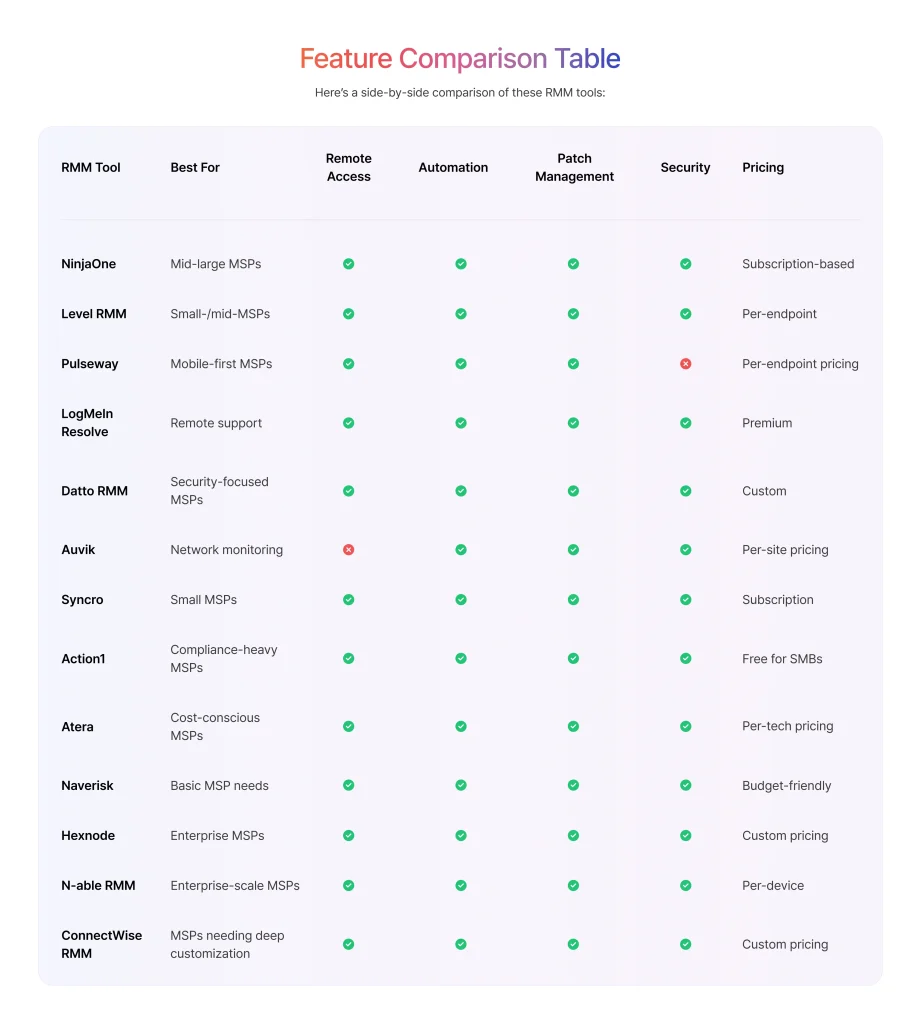
Here’s a breakdown of the best RMM software options for MSPs, with their standout features, pricing models, and pros & cons.
NinjaOne is a cloud-first RMM solution known for its simplicity and automation capabilities.
✅ Key Features:
Pros: Fast setup, intuitive UI, excellent automation
Cons: Limited scripting flexibility
Level RMM is a modern, automation-first RMM built for MSPs who want to scale faster and work smarter.
✅ Key Features:
Pros: Lightweight, MSP-friendly, focused on scalability.
Cons: Relatively newer in the RMM space than legacy incumbents, so some advanced features may still be maturing.
Pulseway is an RMM built for MSPs who need real-time monitoring and remote control.
✅ Key Features:
Pros: Mobile app with full functionality, lightweight but powerful
Cons: Limited third-party integrations
Previously LogMeIn Central, LogMeIn Resolve offers a robust RMM platform.
✅ Key Features:
Pros: Excellent remote desktop experience, good automation
Cons: Higher price compared to alternatives
Datto RMM (by Kaseya) is a scalable, cloud-based RMM built for security-focused MSPs.
✅ Key Features:
Pros: Security-first approach, AI-based automation
Cons: Requires integration with other Datto/Kaseya tools for full functionality
Auvik is a network monitoring-focused RMM, ideal for MSPs managing large infrastructures.
✅ Key Features:
Pros: Best for network monitoring, excellent documentation
Cons: Limited device management features
Syncro combines RMM, PSA, and billing into one platform, perfect for small MSPs.
✅ Key Features:
Pros: Affordable for small MSPs, flexible billing
Cons: Not as feature-rich as standalone RMMs
Action1 Action1 is a zero-touch, cloud-native RMM built with strong compliance and security in mind. It enables IT teams to manage and update endpoints anywhere, made possible through a lightweight agent that must be installed on each device.
✅ Key Features:
Pros: Strong focus on security and compliance, no local infrastructure required
Cons: Less customizable than some competitors
Atera is an RMM & PSA hybrid with pay-per-technician pricing.
✅ Key Features:
Pros: Cost-effective, great for small MSPs
Cons: Lacks advanced enterprise-level features
Naverisk is a lightweight RMM & PSA combo with built-in automation.
✅ Key Features:
Pros: Affordable, simple UI
Cons: Lacks integrations compared to major RMMs
Hexnode is a unified endpoint management (UEM) solution with powerful RMM features.
✅ Key Features:
Pros: Great mobile device management (MDM) integration, scalable for large enterprises
Cons: Can be complex for smaller MSPs
N-able RMM solution is an all-in-one platform for MSPs to monitor, secure, automate, and scale their service operations.
✅ Key Features:
Pros: Strong for scale, security, and comprehensive endpoint support.
Cons: More feature-richness brings a steeper learning curve and a higher cost up-front.
ConnectWise RMM solution delivers all your MSP endpoint and network monitoring, patching, scripting and automation
✅ Key Features:
Pros: Enterprise-ready, long pedigree, deep automation capability.
Cons: May feel heavy or complex for smaller MSPs, and cost/licensing may scale up fast.
How to Choose the Right RMM for Your MSP Business
The best RMM for your MSP depends on your business needs, budget, and workflow requirements. The right choice will improve efficiency, reduce downtime, and scale with your business.
Which RMM are you using in 2026?
RMM (Remote Monitoring and Management) tools help MSPs monitor client devices, automate maintenance, and resolve issues remotely, improving efficiency and reducing downtime.
RMM tools detect issues before they become critical, automate repetitive tasks, and send real-time alerts, helping MSPs resolve tickets faster.
Yes, small MSPs can manage multiple clients efficiently, automate routine tasks, and scale operations without hiring more staff.
Consider features, pricing, ease of use, scalability, and integration options to pick an RMM tool that aligns with your MSP workflow and client needs.
MSPs can track reduced ticket resolution times, decreased downtime, automated maintenance tasks, and client satisfaction improvements to measure ROI. Effective RMM tools help save time, lower operational costs, and increase profitability.

Get exclusive content on the MSP industry and become a part of the DeskDay community.