

 Team DeskDay Team DeskDay
The DeskDay Pax8 integration connects your Pax8 account to DeskDay, maps each Pax8 customer to a DeskDay customer, imports every subscription with its quantity, vendor cost, and sell price, and puts each one on the right recurring invoice. After that, DeskDay syncs with Pax8 every day. You can also sync customers or subscriptions on demand.
Clear customer matches map automatically. Close-but-uncertain matches wait in a Needs review queue, so nothing lands on the wrong account. The integration is live now in DeskDay.
MSPs that resell cloud licenses through Pax8 usually reconcile billing by hand, and month-end turns into a matching exercise. Customer names don’t line up between Pax8 and the PSA, quantities change mid-cycle, and every change has to be carried onto a recurring invoice manually. Miss one and you are either under-billing or explaining an invoice to a client.
The manual process breaks down into four hand-offs:
The DeskDay Pax8 integration is built to remove all four hand-offs.
DeskDay is an AI-native PSA with service desk, project management, timesheet, billing, announcements, workflow automation, and a triage and dispatch agent. The Pax8 integration adds billing automation for MSPs that resell through Pax8. It covers six capabilities:
| Capability | What it does |
|---|---|
| Customer mapping | Matches Pax8 customers to DeskDay customers, creates new ones, and holds uncertain matches for review |
| Subscription import | Brings in each Pax8 subscription with product, SKU, quantity, vendor cost and sell price |
| Recurring invoice linkage | Places each subscription on a recurring invoice; the customer’s default recurring invoice is preselected |
| Daily sync | Refreshes quantities, vendor costs and sell prices from Pax8 every day |
| Sync on demand | Lets you sync customers or subscriptions whenever you need to |
| Failed-mapping alerts | Notifies the roles you choose, with a direct link to the record, when a mapping needs attention |
Setup has four steps.
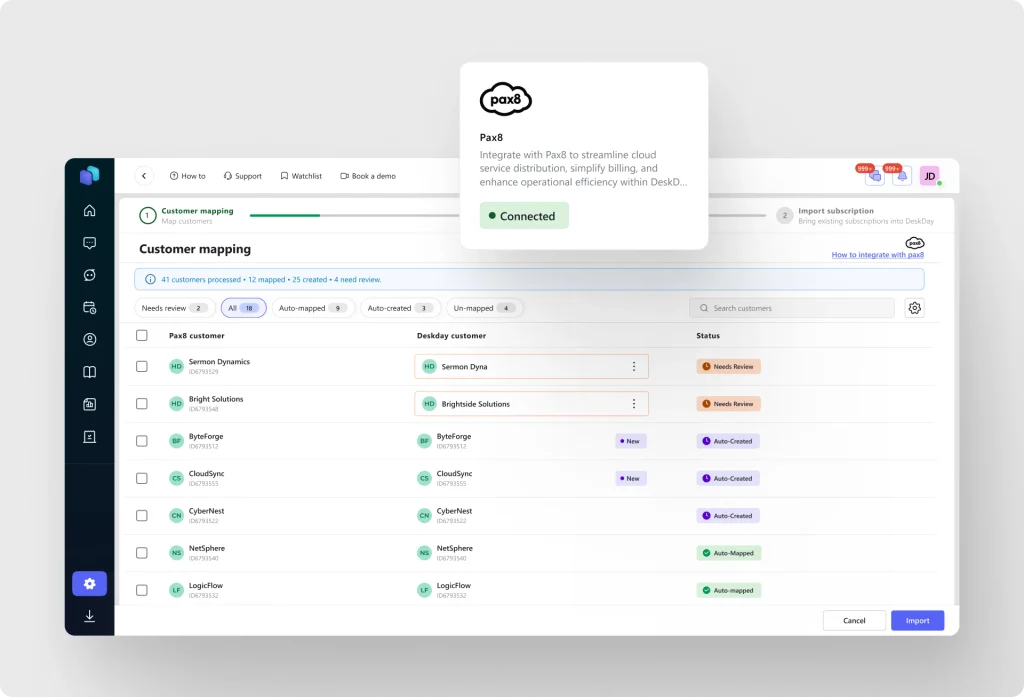
Customer names rarely match across Pax8 and a PSA, so DeskDay maps customers in three ways. Clear matches map automatically. A customer that exists in Pax8 but not in DeskDay can be created on the spot. A match that is close but not certain is held for review instead of being guessed.
You choose how much to process: new customers only, all unmapped customers, or everything. Holding uncertain matches means a subscription cannot silently land on the wrong customer’s invoice.
The product’s mapping screen shows how this looks. – use this data for example screen of customer mapping
Every Pax8 subscription is imported with its product, SKU, quantity, vendor cost and sell price. DeskDay preselects the customer’s default recurring invoice for each subscription, and you can pick a different recurring invoice per row.
Three rules keep invoices clean:
DeskDay syncs with Pax8 every day, so quantities, vendor costs, and sell prices stay current without a manual export. When you need fresh data sooner, you can sync customers or subscriptions on demand. The last successful sync shows on the integration card, so you can see when your billing data was last refreshed.
When automation cannot complete a mapping, DeskDay notifies the roles you choose, with a direct link to the record.
Take the product’s own example. Northwind Dental Group is a Pax8 customer that DeskDay auto-maps to Northwind Dental. Their Microsoft 365 Business Premium subscription comes in with a quantity of 24, along with its SKU, vendor cost, and sell price, and is placed on Northwind Dental’s default recurring invoice.
If seats change later in the cycle, the next daily sync updates the same invoice line because the subscription keeps its Pax8 ID. If the quantity drops to zero, the subscription stays off the invoice. You can also run a subscription sync on demand before invoices go out.
It connects your Pax8 account to DeskDay, maps customers, imports subscriptions with quantity, vendor cost and sell price, and links them to recurring invoices. It keeps them in step with Pax8 every day.
MSPs that resell cloud licenses through Pax8 and bill customers on recurring invoices.
Enter your Pax8 client ID and client secret in DeskDay. DeskDay validates them with Pax8 and stores the secret encrypted.
Clear matches map automatically, and new customers can be created on the spot. You can auto-map new customers, all unmapped customers, or everything.
Close-but-uncertain matches are held under Needs review until you confirm them, so nothing lands on the wrong account.
Product, SKU, quantity, vendor cost and sell price, plus the Pax8 ID that identifies the subscription.
The customer’s default recurring invoice is preselected. You can change it per row.
No. Each subscription keeps its Pax8 ID, so later syncs update the same recurring invoice item.
No. They stay off the invoice.
Every day. You can also sync customers or subscriptions on demand.
The last successful sync shows on the integration card.
DeskDay notifies the roles you choose, with a direct link to the record.

Get exclusive content on the MSP industry and become a part of the DeskDay community.




